 Lives in your menu bar · speaks MCP
Ephemeral sessions,
persistent context.
Coding agents forget. rememd is a menu bar app and an MCP server that keep the reasoning around your work - what was decided, what was ruled out and why, what actually happened - and hand it to whichever agent is working right now. Claude Code in the morning, Cursor in the afternoon: your reasoning outlives the harness.
A menu bar app. Your context stays on your disk, or a Postgres you run.
# connect the terminal you are working in
$ rememd connect
  ↳ the menu bar opens and asks what to connect to

✓ Connected to Commerce · Checkout rewrite
  Started session 4F2A9C31
  Agents in this terminal will pick this up automatically.

# then start your agent however you already do
$ claude          # or codex, or anything that speaks MCP
Every session starts from nothing.
So the first twenty minutes go on re-explaining the codebase, the constraints, the three approaches already tried and abandoned, and why the obvious fix is wrong here. That re-explanation is the tax, and it is paid again on the next session, and by every other person on the project.
The knowledge exists. It is scattered across closed terminals, chat scrollback, a PR description nobody reads twice, and one person’s head. Nothing collects it, so nothing compounds.
And it is not only time that scatters it. The little that does persist persists inside whatever you were using - a memory in one chat app, a rules file in one editor, a project that only exists in one company’s account. Context kept inside an assistant is only ever as portable as that assistant, so using two in a day starts the same reconstruction sideways that ending a session starts forwards.
None of which is the model forgetting. A model is not meant to hold your project between sessions; it is meant to reason about it, and it does that well every time you spend twenty minutes putting it back. So the gap is not memory. The gap is that nothing carries the reasoning across - not to the next session, and not to the tool you open after this one.
It lives in the menu bar.
No window to keep track of, no tab competing with your editor. One click and the whole ladder is there - the connected session and what it is doing, its tasks, its notes, the backlog underneath it, and anywhere else the work has spread to. One click again and it is gone.

Context is not one document. It narrows as you descend.
Workspace, product, focus area, feature. Four levels, each one a smaller and more specific slice than the one above it. This is the whole idea - and it is what makes rememd something other than a folder of notes.
- Workspacethe org and its conventions
How you work, everywhere. The things that would be true on any product you own.
- Productwhat this product is for, and what past features taught us
The vision, plus the accumulated knowledge - decisions, gotchas, dead ends worth not repeating.
- Focus areathe slice of the product this belongs to
Subsystem-level context. The material that matters to the auth layer but not to billing.
- Featurewhat we are building right now
The PRD, its tasks, and the sessions that have worked on it.
Reading goes down. Ask for a feature’s context and the whole ladder is assembled, narrowest first - PRD, focus area, product vision, product knowledge, workspace. An agent lands with the same picture a colleague would have.
Distilling goes up. When a feature finishes, what it taught is split across the levels that will still care in six months. Most of it belongs to the slice you were working in and stops mattering when that work ships; the little that outlives it goes higher. A rewrite, not an append - so each document stays one coherent thing, and stays short enough to read in full.
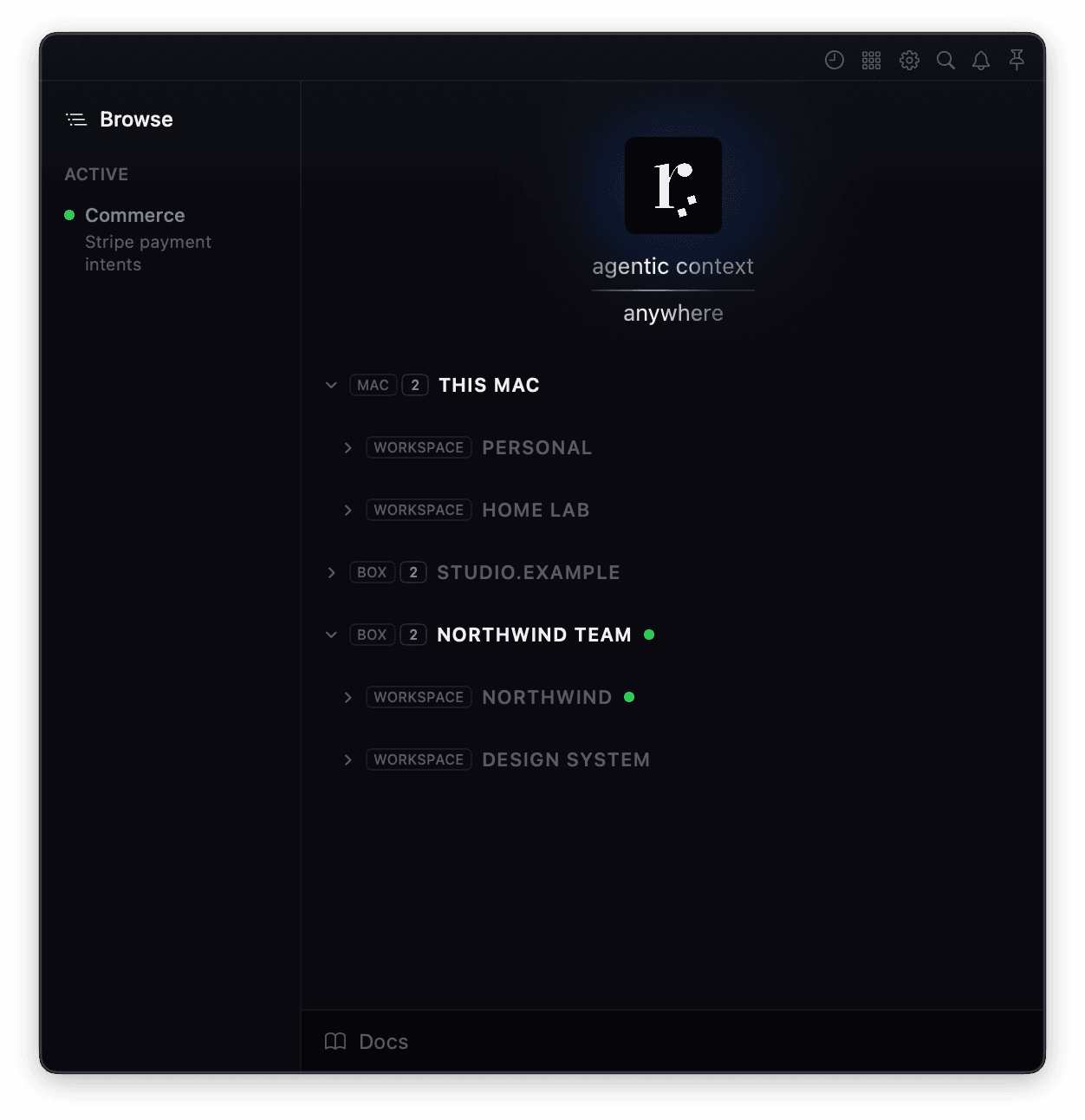
The same four levels, in the app.
Workspace, product, focus area, feature - the tree you navigate is the ladder, not a separate idea layered on top of it. Open a feature and everything above it comes with the context.
Above the workspaces sits one more level: the place they live. This Mac, your own box, the team's box - each a node with its workspaces under it, so where a thing lives is read off its position and never off a label.
That is the compounding loop. Every finished feature makes the next one cheaper to start.
Context is finite. Spend it on the level you are standing on.
A context window is a budget, and that is the real problem with keeping notes in a folder. The notes are not the issue. Handing an agent all of them is - the budget goes on the forty things it is not doing, and the one thing it is doing arrives last.
Descending the ladder is what makes the slice small. Connect to a feature and the agent gets that feature: its PRD, its tasks, the sessions that produced it, and the knowledge standing above it. Not the other fifty features in the product. Connect to a focus area instead and it gets that component - its features, its backlog, what it has learned - and nothing from the ones beside it. Stand on whichever level the work is on.
Even then it does not arrive as a wall of text. The slice you are standing in comes in full, because that is the part you are about to act on. Everything above it comes back as an index - the headings, every claim stated in a line, and how much sits behind each one - and is read in full only when it turns out to matter. An agent that cannot see a gotcha exists does not go looking for it, so naming them all is the point. The rest of the product arrives the same way, as names with a line each: an agent that knows a component exists can ask for it, and one that does not builds a second one beside it. Breadth by name, depth on demand.
Finished work stops costing you, without going anywhere. Archive a feature and it leaves the listings and the tree, keeping its PRD, its sessions and its diagrams exactly where they were. It stays addressable by name, it still turns up in search, and starting a session on it brings it back on its own.
Nothing decays on a timer. A feature untouched for three months is often the one you are about to pick up again, so nothing is hidden for going quiet, only because you said so. And every list that leaves something out says how much it left out.
The fair objection to memory products is that what they store goes stale, and against a store of facts about a codebase it lands: the code moves, the facts quietly stop being true, and the agent should have read the file instead. Almost nothing kept here is that kind of fact. A decision is historical rather than descriptive - why an approach was abandoned in March is still why it was abandoned in September, whatever the file looks like today - and it is the part that reading the repository never recovers.
What does get checked is whether a lesson still points at something real. A gotcha can name the file it depends on, and when that file goes, the gotcha is flagged the moment an agent is about to rely on it. Flagged, never rewritten: whether a lesson survived the code is your call.
You say it. rememd writes it down.
There are no commands to learn and no syntax to remember. You talk to your agent the way you already do, and the durable parts get captured as they come up - in the middle of the work, which is the only time anyone would actually do it.
“What did we do here last?”
Read onlyReturns the last session - what shipped, what broke, and what it left unfinished - before you have finished asking.
“Make a note that we should probably simplify the auth part.”
Note addedWrites the note against this feature, where the next session will find it rather than where you will forget it.
“I don’t get how the API gets a fresh token. Draw it.”
SketchOpens a sketch: a one-off picture in a rememd window, marked as a sketch, and saved nowhere until you say keep it.
“Keep that as a diagram.”
Diagram addedTurns it into Mermaid kept with the feature - not pasted into a markdown file nobody opens twice.
“Add that to the backlog, high priority.”
Backlog item addedFiles a backlog item with a real description, ready to become a feature with its own PRD and tasks.
“Log the session.”
Session loggedSummarises the work into the log the next session opens with - to every feature it touched, not only the one you connected to.
“Promote this to product knowledge.”
Knowledge promotedDistils what the feature taught up to the level that will still care about it in six months.
Every write raises a toast
Not decoration - a receipt. Anything meaningful that lands says so, so you are never guessing whether the note actually got written. And the toast is clickable: follow it and you arrive at the exact row it just wrote, highlighted.
Backlog and tasks, in the same breath
“We should build X” becomes a backlog item. A backlog item becomes a feature with a PRD. A PRD becomes tasks that give the session a spine. All of it said out loud rather than typed into a tracker in another tab.
Work moves. The filing should follow it.
Give every feature its own terminal and the problem disappears - the terminal you are typing in is the answer, and that is exactly how rememd files things: one terminal, one session, even two side by side in the same folder. It holds until you are deep in one feature and fix something in another, which is most days.
- Checkoutthe whole day, including the two thirds of it that were not Checkout
- Refundsnothing recorded
- Searchnothing recorded
- Checkoutwhat actually happened in Checkout
- Refundsthe rounding bug, and why it was there
- Searchthe index gotcha you hit on the way past
So connect to one feature, end up in another, and rememd attaches the second one for you. The panel shows it happening, every write says which feature it landed in, and logging the session writes a log to each feature the work actually touched.
It does not move your target. Untargeted writes still land where you connected, reading a feature never counts as working on it, and a feature with nothing recorded against it is dropped rather than logged.
Ask for a picture of anything.
It opens in rememd, marked as a sketch, and it is saved nowhere until you say keep it. So asking is free: say you do not understand something, get a drawing of it back, and if it did not help, close the window.
Not an image, not a file, not a webpage. It is a window in the app, drawn in rememd’s own palette and type from markup the agent has just written - which is why it can show you a shape that no chart type covers.
What is actually in the token store
The client only ever holds the short one. That is the whole reason for the extra round trip.
Ask for a diagram and you get a diagram.
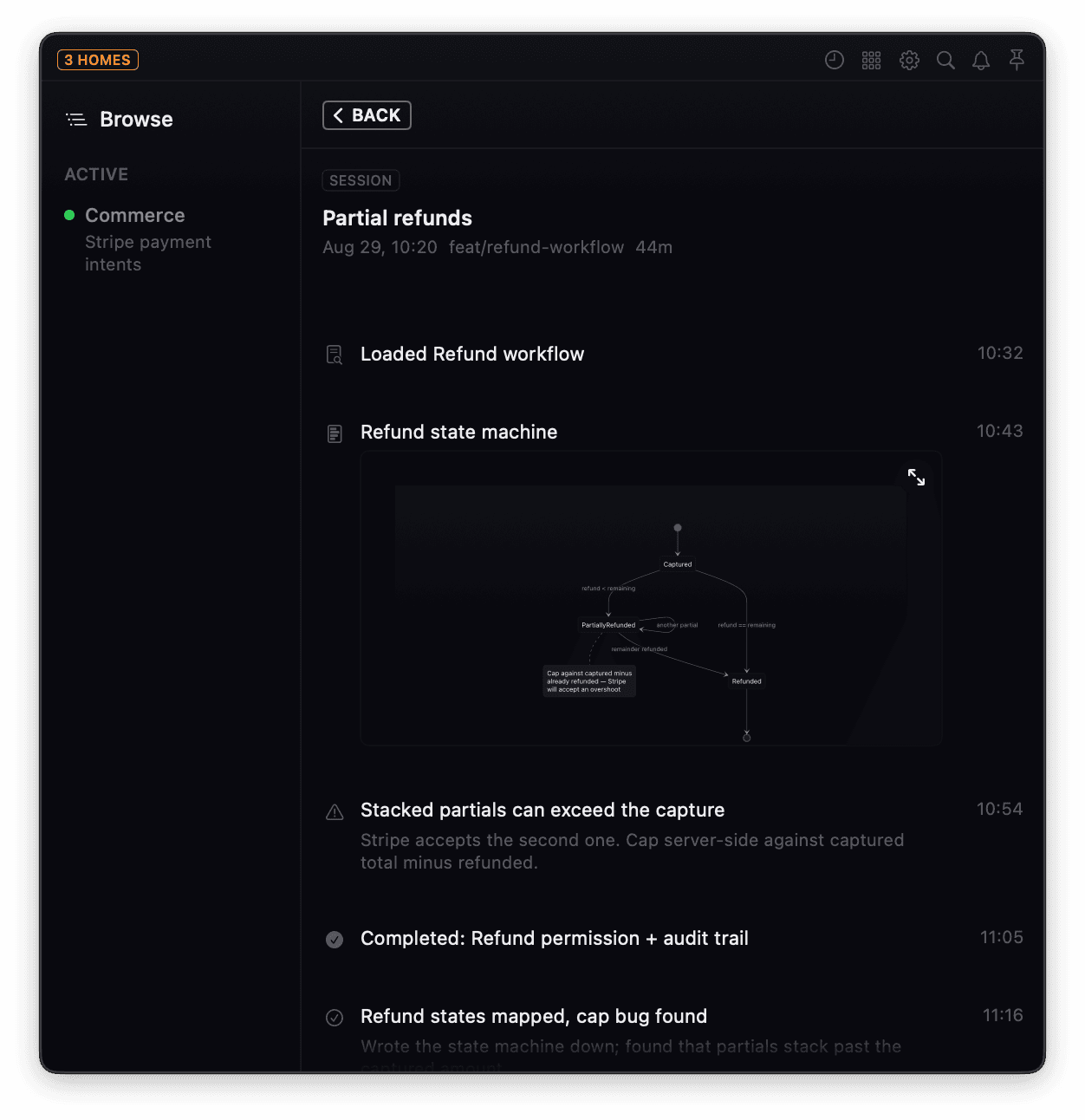
Say keep it and the agent writes the sketch up as a diagram - or ask for one outright and skip the sketch entirely. Either way it is Mermaid, rendered by rememd and kept with the feature it belongs to, so the drawing is still there next month, next to the PRD it explains. Not a fenced code block you have to paste somewhere to see.
Open a level, and it is all still there.
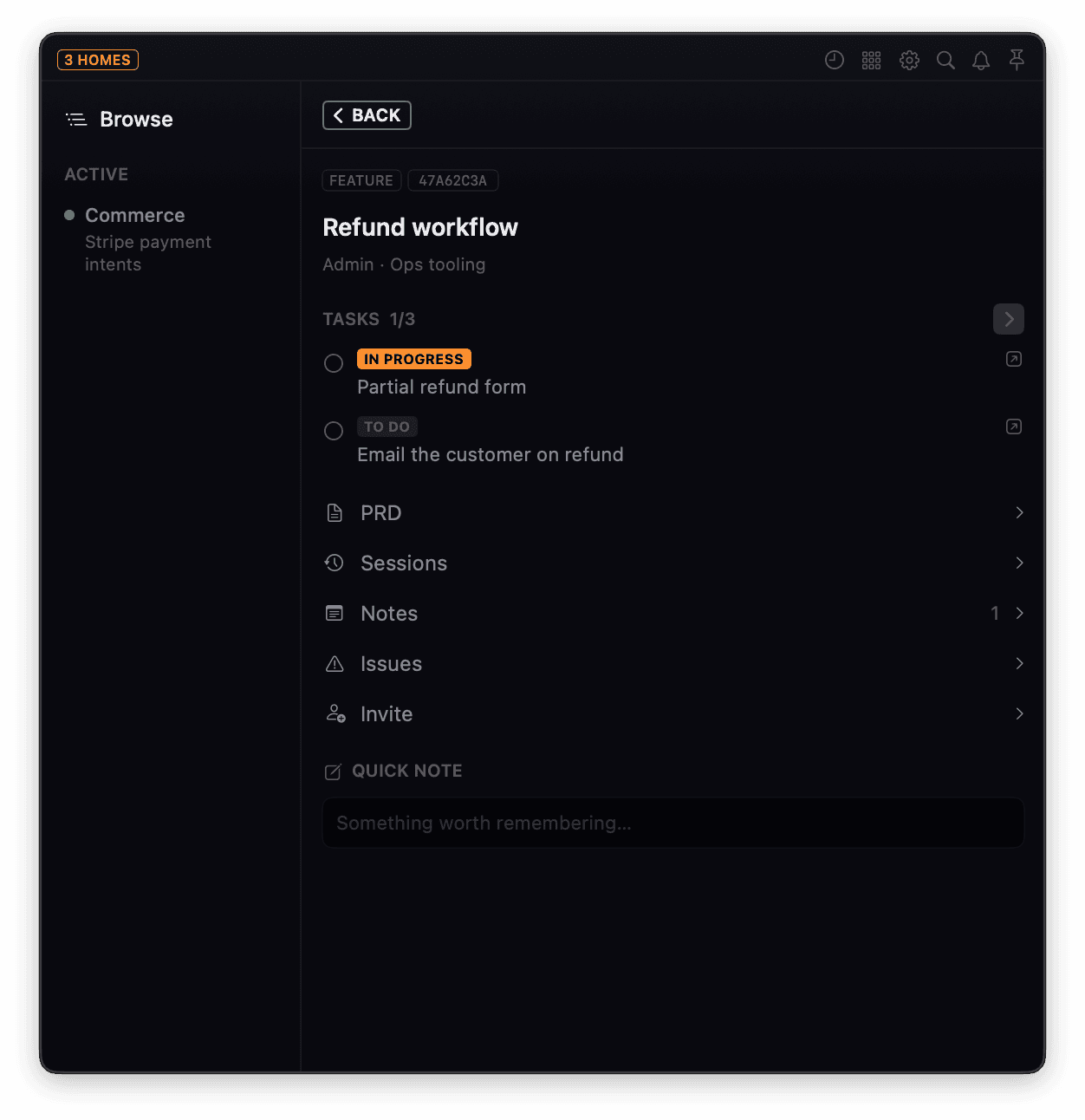
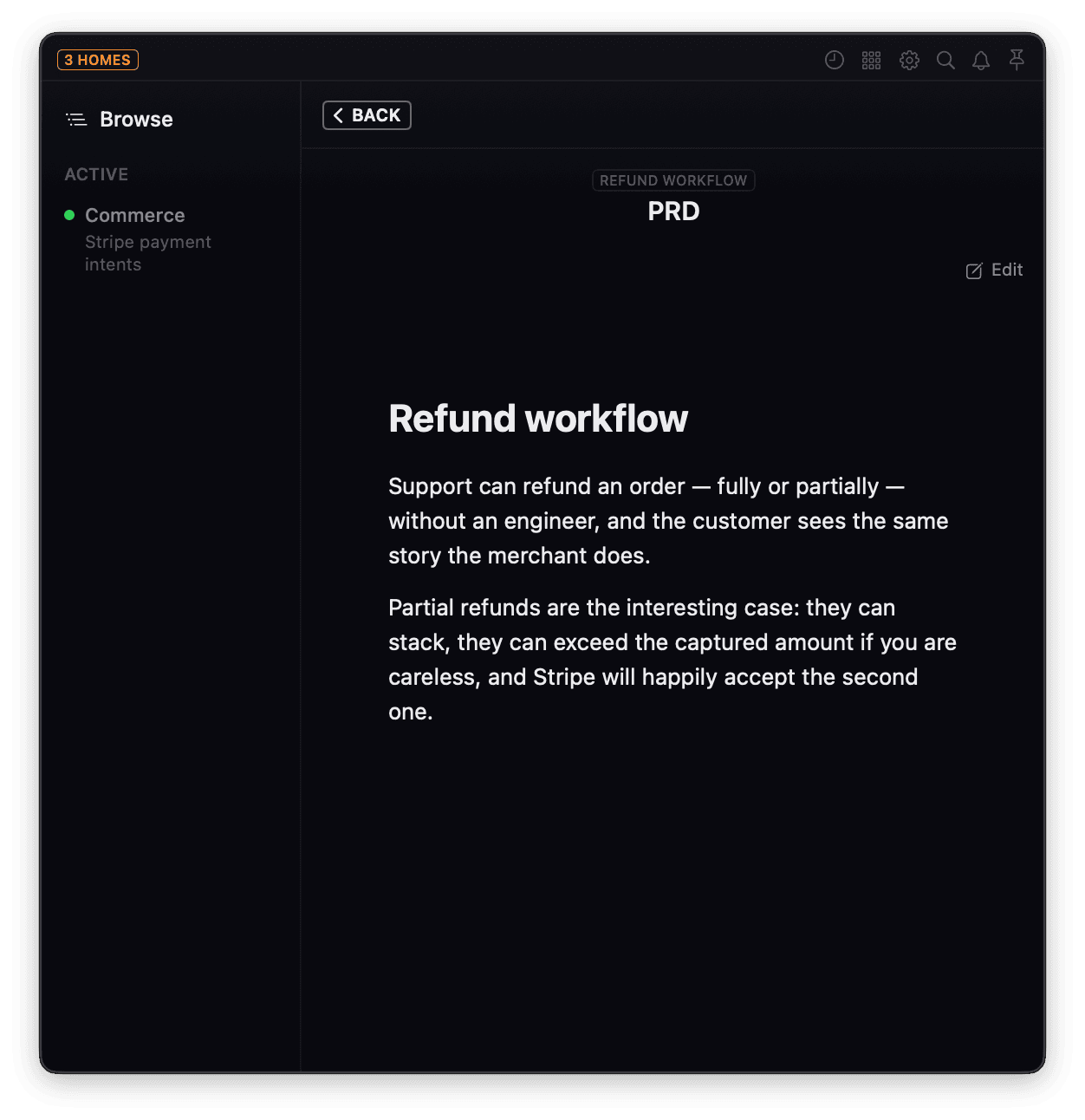
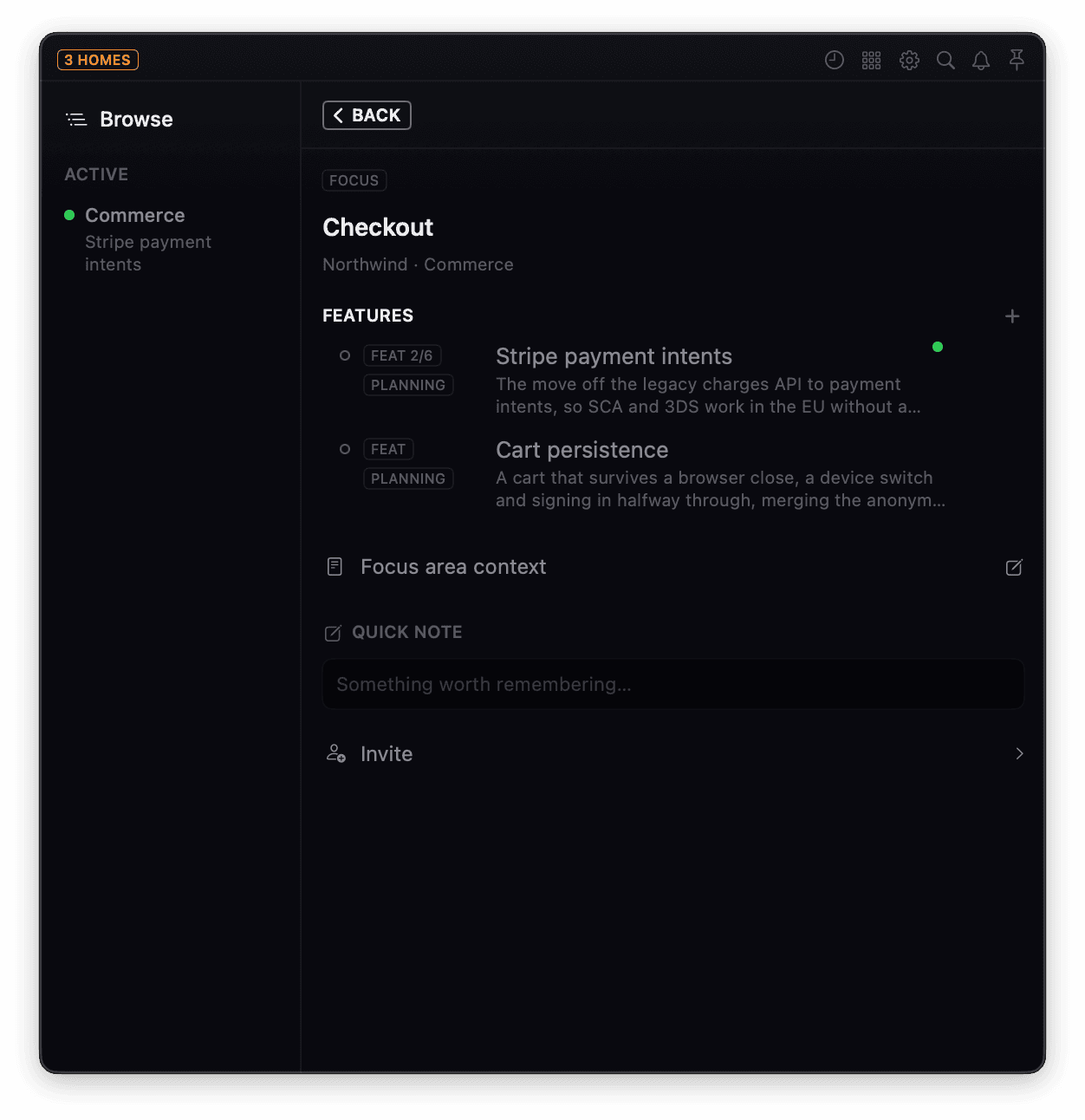
The same four levels, one at a time. A feature with its tasks. The PRD it was written from. A session six weeks later, carrying the diagram it drew and the gotcha it hit. A focus area that says what is underneath it, a sentence per feature. Plain documents in a panel, not an export you have to go looking for - and every one of them yours to touch. Fix a note, add a task, file an issue, rename a feature, without asking an agent to do it for you.
It never launches your agent.
There is no wrapper, no fork of your editor, and nothing to configure per project. You start your agent the way you already do - rememd joins the conversation it is already having.
Start your agent
However you already start it. rememd does not launch it, wrap it, or watch the folder it is running in.
Run rememd connect
One command in the terminal you are working in. Run it bare and the menu bar asks what to connect to; name the product, focus area or feature outright and it skips the picker. Either way that connection is what makes the session a target - nothing that was never connected is recorded.
Context arrives through tool calls
Not a file injected at startup. The agent asks for what it needs as it needs it, and writes back what it learns as it learns it.
Not a Claude accessory
rememd speaks MCP, so anything that speaks MCP can use it - Claude Code, Codex, Cursor, VS Code, whatever you move to next. It contains no model and makes no inference of its own. The agent supplies intelligence; rememd supplies continuity.
The agent writes, you curate
Capture has to be nearly free or it does not happen, so the agent does it mid-work through tools. But everything it writes is a plain document you can open, correct, and delete. No write path produces something only a machine can read.
Context follows you anywhere. Talk to it there.
 Claude
 ChatGPT
Build with Codex through the morning. Think the shape of the thing through with ChatGPT over lunch, away from the keyboard. Pick the code back up in Claude Code that evening. Three models, three windows, one piece of work - and each one starts where the last one stopped, because the context was never inside any of them.
Talking to it is the same everywhere: ask for the PRD, note the gotcha, log the session. There is nothing to learn past saying what you want. The two halves of that day do not cost the same, though - the terminal needs nothing, and the chat needs a backend of your own to point at.
Anything that speaks MCP
At a terminal the client spawns rememd itself, so Claude Code, Codex, Cursor, VS Code and whatever replaces them all get the same tools with nothing written per editor.
Your own box, as a connector
Stand up the backend - the same one a shared workspace uses - and it speaks MCP over HTTPS behind OAuth. Register that URL once as a connector and your context is in the chat you already have open. Reads come back shaped as markdown, so asking for a PRD returns a document to read rather than a tool call to decode.
The conversation is the terminal
A chat has no folder to key on, so it connects by being asked: one target, bound for the life of that conversation. Changing feature in one chat leaves every other chat where it was, and the hour you spent there is recorded as one sitting, however many features it touched.
Say it on a walk. Find the pull request when you are back.
A conversation with no terminal can still hand work off. Once a task is written down, say go and an agent running on your own box picks up the brief. A verify brief reads the product and the code and files what it found. A build brief does the work on a branch and ends with a pull request open, and the task carries PR READY until you have dealt with it.
Nothing runs unless you said yes to that piece of work. A brief that only verifies can add a finding and change nothing that exists, and whatever an unattended run writes is badged as unreviewed. Your box, your repository, a credential minted for that one run - and the agent never holds the keys to push.
Self-hosted is the feature, not the caveat.
Every workspace names its own home: markdown and JSON on your disk, or a Postgres you run - and a machine can hold several boxes at once, each a node at the top of the tree. There is no rememd-hosted tier holding your context hostage - what you capture sits where you put it.
On your disk
Markdown and JSON in a folder. Readable, greppable, and versionable with the tools you already have. Nothing leaves the machine.
On a box
A backend you stand up once - Postgres and the server - for working across machines or with other people. Register it with its address and token, or accept an invite to somebody else's, and it appears beside This Mac as its own node. Point a workspace at it and that workspace lives there. The rest of your work stays where it was, because a home belongs to a workspace rather than to the machine.
Opt in, always
rememd records what you ask it to. An agent running in a folder has not asked. Nothing is listed, watched, or nagged about unless it was connected on purpose.
Shared context, scoped honestly.
Sharing means granting someone one level and everything beneath it - nothing above, nothing beside. The grant is a subtree rather than a role, so access is somewhere you stand rather than a permission to reason about.
- WorkspaceNorthwindpath only
Visible as a location, so shared work can be placed. Its conventions are not.
- ProductCommercepath only
The name, not the vision and not the knowledge underneath it.
- granted
- Focus areaCheckoutshared
The level you chose. Its context opens.
- FeatureStripe payment intentsincluded
Beneath the grant, so it comes too - PRD, tasks, sessions, notes.
A grant is a subtree. Share a focus area and everything under it comes with it. Nothing above does, and nothing beside it either - the sibling focus area and its features stay invisible.
Above the grant is path, not contents. A guest can see where their work sits, because work is hard to place without it. Being shown the shape of an organisation is not the same as being shown what it knows.
That boundary is enforced where the data is read and written, not drawn in the interface. Every lookup resolves inside the workspace it was asked in, and being able to see that a container exists is not the same as being able to read what is inside it. It is the difference between a scope you can describe and one you can rely on.
It runs both ways. Invite someone to a feature and that feature is what lands on the box: they get it and everything beneath it, with the containers above showing as a path rather than as documents. Everything else they have stays on their own machine, because joining an instance points one workspace at it rather than moving their work onto it. Nobody gives up custody of their own context in order to read yours.
A team is not a different rememd - no tier to move to, and nothing hosted by us. It does ask for the one thing a folder on your disk does not: a backend to share through. Postgres, the server and Caddy, on your own machine or a box you rent. Wherever you put it, it stays yours, and only the workspaces you point at it go there.
What rememd is not.
- Not a model, an agent, or a wrapper around one
- Not a note-taking app - notes are a capture path, not the point
- Not project management; tasks exist to give a session a spine, not to run a sprint
- Not an observer of everything you do

Your context should outlive the session.
Connect a terminal and be oriented in seconds. Whatever you are using next week picks the work up where this week left it, and everything you captured getting there stays on a disk you own.